Module 2: RNA-seq alignment concepts and file formats
Module 2 - Learning objectives
- RNA-seq alignment challenges and common questions
- Alignment strategies
- STAR
- Introduction to the BAM and BED formats
- Basic manipulation of BAMs
- Visualization of RNA-seq alignments in IGV
- Alignment QC Assessment
- Pseudo-alignment
Module 2 - Practical Exercises
STAR alignment
Prepare genome for alignment
If not done previously, prepare the genome for PE100:
cd $RNA_REFS_DIR
STAR --runMode genomeGenerate \
     --genomeDir ./star_index \
     --genomeFastaFiles chr22_with_ERCC92.fa \
     --sjdbGTFfile chr22_with_ERCC92.gtf \
     --sjdbOverhang 99
STAR Alignment
Perform alignments with STAR to the genome.
First, begin by making the appropriate output directory for our alignment results.
The output of this step will be a BAM file for each sample.
Export samples name in environment variable to make a loop:
SAMPLES=(
UHR_Rep1_ERCC-Mix1_Build37-ErccTranscripts-chr22
UHR_Rep2_ERCC-Mix1_Build37-ErccTranscripts-chr22
UHR_Rep3_ERCC-Mix1_Build37-ErccTranscripts-chr22
HBR_Rep1_ERCC-Mix2_Build37-ErccTranscripts-chr22
HBR_Rep2_ERCC-Mix2_Build37-ErccTranscripts-chr22
HBR_Rep3_ERCC-Mix2_Build37-ErccTranscripts-chr22
)
Loop for the mapping:
STAR_INDEX=${RNA_REFS_DIR}/star_index
for S in ${SAMPLES[@]}
do
  echo "Aligning $S"

  STAR \
    --runThreadN 8 \
    --genomeDir $STAR_INDEX \
    --readFilesIn \
      $RNA_DATA_TRIM_DIR/${S}.read1.fastq.gz \
      $RNA_DATA_TRIM_DIR/${S}.read2.fastq.gz \
    --readFilesCommand zcat \
    --outFileNamePrefix $RNA_ALIGN_DIR/${S}. \
    --outSAMtype BAM SortedByCoordinate \
    > $RNA_ALIGN_DIR/${S}.STAR.log 2>&1
done
Argument description
--runThreadN 8
Number of threads used for alignment (speeds up computation).--genomeDir $STAR_INDEX
Path to the STAR genome index directory.--readFilesIn
Input files (paired-end reads: read1 and read2).$RNA_DATA_TRIM_DIR/${S}.read1.fastq.gz
Forward reads after trimming.$RNA_DATA_TRIM_DIR/${S}.read2.fastq.gz
Reverse reads after trimming.--readFilesCommand zcat
Uncompress gzipped FASTQ files on-the-fly.--outFileNamePrefix $RNA_ALIGN_DIR/${S}.
Prefix for all output files generated by STAR.--outSAMtype BAM SortedByCoordinate
Output alignment file in BAM format, sorted by genomic coordinates.> $RNA_ALIGN_DIR/${S}.STAR.log 2>&1
Redirect standard output and error messages to a log file for each sample.
Refer to STAR manual for a more detailed explanation:
The basic options to run a mapping job are as follows:
Use samtools view to see the format of a BAM alignment file:
cd $RNA_ALIGN_DIR
samtools view -H HBR_Rep1_ERCC-Mix2_Build37-ErccTranscripts-chr22.Aligned.sortedByCoord.out.bam
samtools view HBR_Rep1_ERCC-Mix2_Build37-ErccTranscripts-chr22.Aligned.sortedByCoord.out.bam | head
Question 1
- What type of information is contained in the header of the BAM file?
Show answer
The header (shown with samtools view -H) contains:
Reference sequences (chromosomes, transcript IDs) Alignment metadata (aligner used, version, parameters) Read group information (sample, library, sequencing platform)
- How is each alignment line structured? Name at least 5 fields
Show answer
Each alignment line (SAM format) contains tab-separated fields:
- QNAME → read name
- FLAG → bitwise flag (read properties)
- RNAME → reference (chromosome/transcript)
- POS → alignment position
- MAPQ → mapping quality
- CIGAR → alignment structure
- RNEXT → mate reference
- PNEXT → mate position
- TLEN → fragment length
- SEQ → read sequence
- QUAL → base quality
Plus optional fields at the end
- What does the FLAG field represent?
Show answer
The FLAG is a bitwise integer encoding properties of the read: Examples:
- 0 → single-end, mapped
- 16 → read mapped to reverse strand
- 4 → unmapped read
- 99 / 147 → paired-end properly aligned
It encodes multiple binary properties in one number
Question 2
Why is RNA-seq alignment more complex than DNA-seq alignment?
- What is the role of splice-aware aligners like STAR?
- What biological phenomenon makes alignment more challenging?
Question 3
Why is BAM preferred over SAM?
Post-alignment QC
STAR generates a summary of the alignments in a .log file for each sample. Notice the number of total reads, reads aligned and various metrics regarding how the reads aligned to the reference. To help alignment QC, multiQC can be used to aggregate the alignemnt statistics.
Run the following command at the root of your project, so multiqc can screen for fastQC, fastp and star statistics.
Go through the generated html by browsing through the following directory in a web browser, replacing ## with your student number:
Question 4 What percentage of reads successfully aligned to the reference genome?
- Is this alignment rate acceptable?
- What could explain a low alignment rate?
Show solution
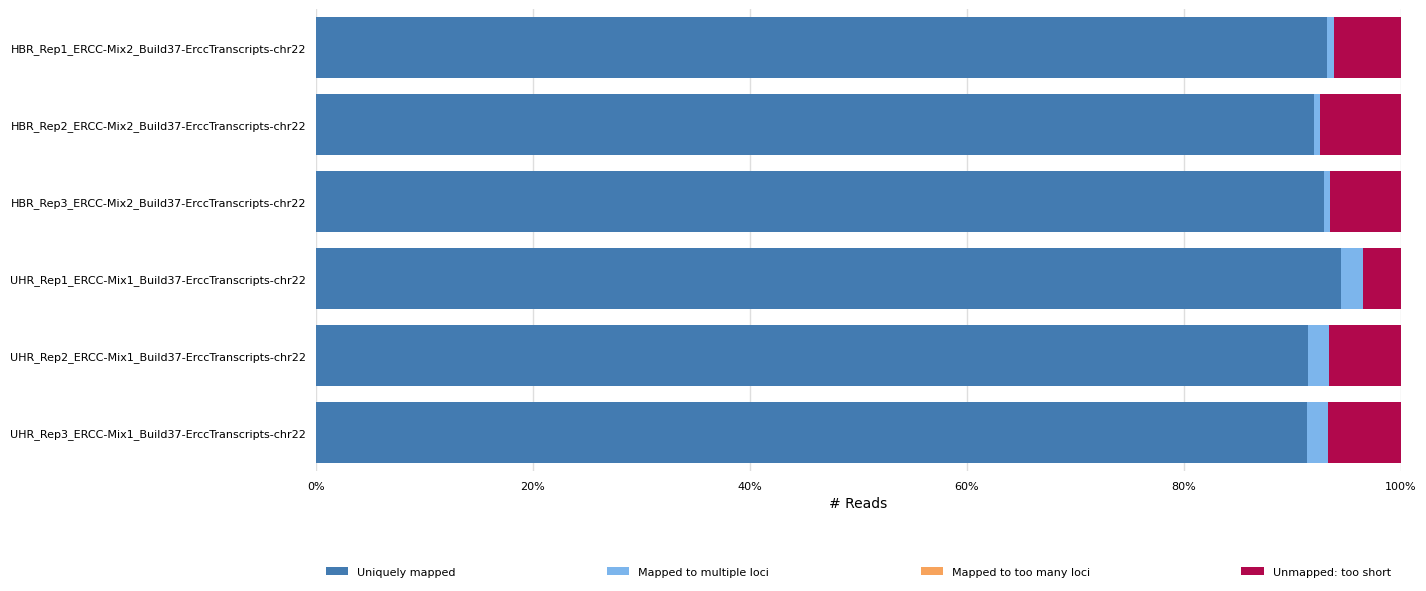
Question 5 How many reads are uniquely mapped vs multi-mapped?
- Why are multi-mapped reads common in RNA-seq data?
- Should they be included in downstream analysis?
IGV visualization
To facilitate IGV visualization, BAM files can be merged by condition. BAM files also need to be index with samtools.
cd $RNA_ALIGN_DIR
samtools merge -o HBR.bam HBR_Rep1_ERCC-Mix2_Build37-ErccTranscripts-chr22.Aligned.sortedByCoord.out.bam HBR_Rep2_ERCC-Mix2_Build37-ErccTranscripts-chr22.Aligned.sortedByCoord.out.bam HBR_Rep3_ERCC-Mix2_Build37-ErccTranscripts-chr22.Aligned.sortedByCoord.out.bam
samtools index HBR.bam
samtools merge -o UHR.bam  UHR_Rep1_ERCC-Mix1_Build37-ErccTranscripts-chr22.Aligned.sortedByCoord.out.bam UHR_Rep2_ERCC-Mix1_Build37-ErccTranscripts-chr22.Aligned.sortedByCoord.out.bam UHR_Rep3_ERCC-Mix1_Build37-ErccTranscripts-chr22.Aligned.sortedByCoord.out.bam
samtools index UHR.bam
Now that our BAM files have been indexed with samtools we can load them and explore the RNA-seq alignments using the Integrative Genomics Viewer (IGV).
The exercise below assumes that you have IGV installed on your local computer. If you are unable to get IGV to run locally you may also consider a web based version of IGV that runs in your browser. The interface of the IGV Web App is different from the local install, and is missing a few features, but is conceptually very similar.
To access it simply visit: IGV Web App.
Start IGV on your computer/laptop. You can load the necessary files in IGV directly from your web accessible amazon workspace (see below) using ‘File’ -> ‘Load from URL’.
Make sure you select the appropriate reference genome build in IGV (top left corner of IGV): in this case hg38.
AWS links to bam files:
HBR Rep1 star alignment: http://##.uhn-hpc.ca/rnaseq/alignment/HBR.bam
HBR Rep1 Bam index: http://##.uhn-hpc.ca/rnaseq/alignment/HBR.bai
UHR Rep1 star alignment: http://##.uhn-hpc.ca/rnaseq/alignment/UHR.bam
UHR Rep1 Bam index: http://##.uhn-hpc.ca/rnaseq/alignment/UHR.bai
You may wish to customize the track names as you load them in to keep them straight. Do this by right-clicking on the alignment track and choosing ‘Rename Track’.
Go to an example gene locus on chr22:
- e.g. EIF3L, NDUFA6, and RBX1 have nice coverage
- e.g. SULT4A1 and GTSE1 are differentially expressed. Are they up-regulated or down-regulated in the brain (HBR) compared to cancer cell lines (UHR)?
- Mouse over some reads. What detail can you learn about each read and its alignment to the reference genome.
Exercise
Try to find a variant position in the RNAseq data:
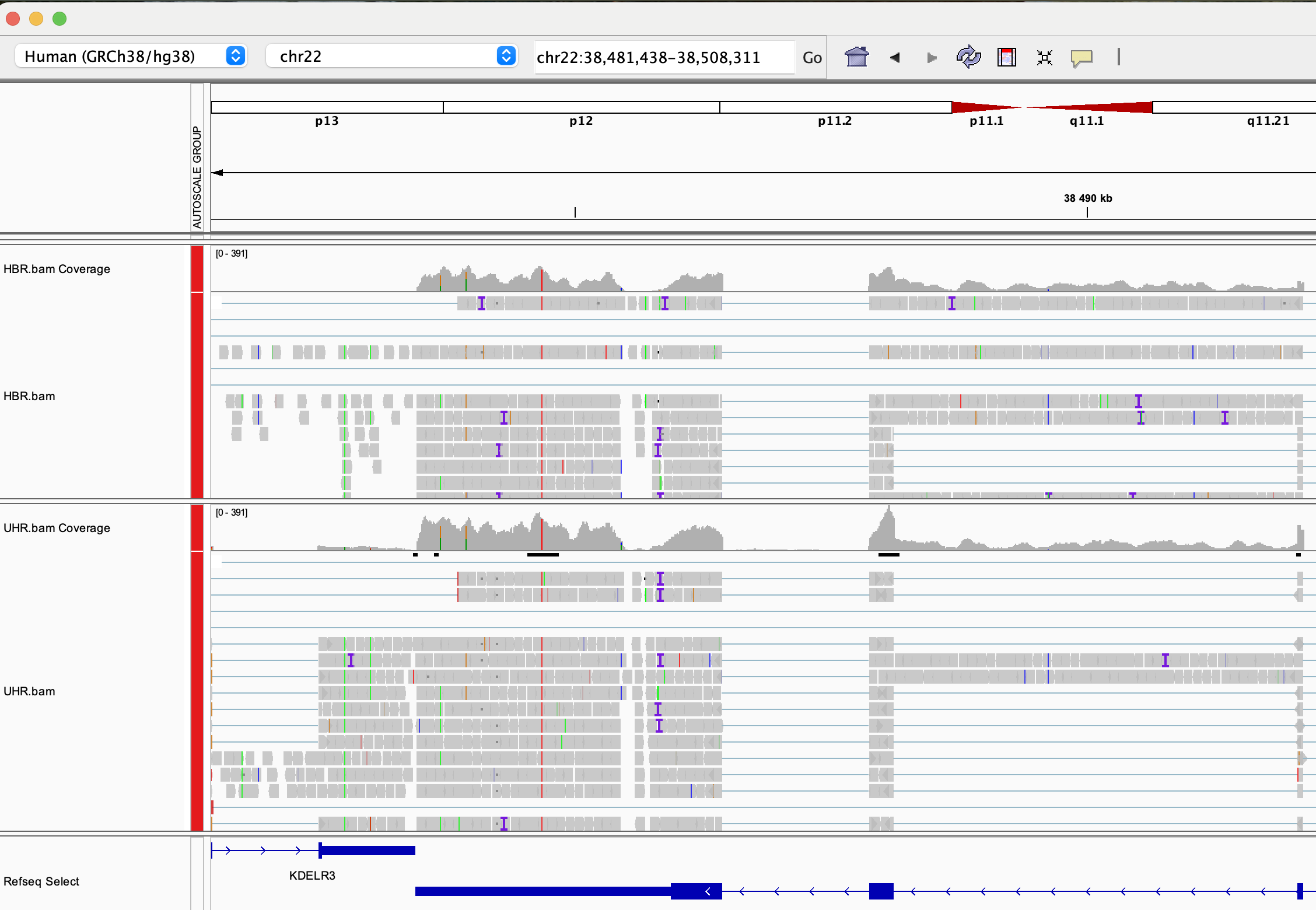
- HINT: DDX17 is a highly expressed gene with several variants in its 3 prime UTR. Click on Refseq track -> expanded to better see gene positions. Other highly expressed genes you might explore are: NUP50, CYB5R3, and EIF3L (all have at least one transcribed variant).
IGV visualization example (DDX17 3 prime region)
Pseudo-alignement with Kallisto
source: Kallisto/
Mini lecture : Kallisto.pdf
Reference transcriptome
To allow us to compare Kallisto results to expression results from STAR, we will create a custom Fasta file that corresponds to the transcripts we used for the STAR analysis. How can we obtain these transcript sequences in Fasta format?
We can use BedTools to create a transcripts fastq file from a transcript GTF file. This approach is convenient because it will also include the sequences for the ERCC spike in controls, allowing us to generate Kallisto abundance estimates for those features as well. Use bedtools getfasta to create an Ensembl+ERCC92 transcripts fasta file as follows.
cd $RNA_HOME/refs

# Convert GTF to genePred
gtfToGenePred chr22_with_ERCC92.gtf chr22_with_ERCC92.genePred

# Convert genePred to BED12
genePredToBed chr22_with_ERCC92.genePred chr22_with_ERCC92.bed12

bedtools getfasta -fi chr22_with_ERCC92.fa -bed chr22_with_ERCC92.bed12 -s -split -name -fo chr22_ERCC92_transcripts.fa

# to see an explanation of the options used in this command:
bedtools getfasta
Use less to view the file chr22_ERCC92_transcripts.fa. Note that this file has messy transcript names. Use the following hairball Perl one-liner to tidy up the header line for each fasta sequence. This Perl expression looks complex but it is really just looking for header lines the FASTA file that match one of two patterns (those that have names like ERCC… and those that have regular Ensembl transcript names). To learn more about this kind of string matching/parsing, you can refer to the Perl regular expression documentation.
cd $RNA_HOME/refs
cat chr22_ERCC92_transcripts.fa | perl -ne 'if($_ =~/^\>\S+\:\:(ERCC\-\d+)\:.*/){print ">$1\n"}elsif ($_ =~/^\>(\S+)\:\:.*/){print ">$1\n"}else{print $_}' > chr22_ERCC92_transcripts.clean.fa
wc -l chr22_ERCC92_transcripts*.fa
View the resulting ‘clean’ file using less bash command chr22_ERCC92_transcripts.clean.fa. View the end of this file using tail chr22_ERCC92_transcripts.clean.fa. Note that we have one fasta record for each Ensembl transcript on chromosome 22 and we have an additional fasta record for each ERCC spike-in sequence.
Build a Kallisto transcriptome index
Remember that Kallisto does not perform alignment or use a reference genome sequence. Instead it performs pseudoalignment to determine the compatibility of reads with targets (transcript sequences in this case). However, similar to alignment algorithms like Tophat or STAR, Kallisto requires an index to assess this compatibility efficiently and quickly.
cd $RNA_HOME/refs
mkdir kallisto
cd kallisto
kallisto index --index=chr22_ERCC92_transcripts_kallisto_index ../chr22_ERCC92_transcripts.clean.fa
Generate abundance estimates for all samples using Kallisto
echo $RNA_PSEUDOALIGN_DIR
mkdir $RNA_PSEUDOALIGN_DIR
cd $RNA_PSEUDOALIGN_DIR

kallisto quant --rf-stranded --index=$RNA_HOME/refs/kallisto/chr22_ERCC92_transcripts_kallisto_index --output-dir=UHR_Rep1_ERCC-Mix1 --threads=4 --plaintext $RNA_DATA_DIR/UHR_Rep1_ERCC-Mix1_Build37-ErccTranscripts-chr22.read1.fastq.gz $RNA_DATA_DIR/UHR_Rep1_ERCC-Mix1_Build37-ErccTranscripts-chr22.read2.fastq.gz
kallisto quant --rf-stranded --index=$RNA_HOME/refs/kallisto/chr22_ERCC92_transcripts_kallisto_index --output-dir=UHR_Rep2_ERCC-Mix1 --threads=4 --plaintext $RNA_DATA_DIR/UHR_Rep2_ERCC-Mix1_Build37-ErccTranscripts-chr22.read1.fastq.gz $RNA_DATA_DIR/UHR_Rep2_ERCC-Mix1_Build37-ErccTranscripts-chr22.read2.fastq.gz
kallisto quant --rf-stranded --index=$RNA_HOME/refs/kallisto/chr22_ERCC92_transcripts_kallisto_index --output-dir=UHR_Rep3_ERCC-Mix1 --threads=4 --plaintext $RNA_DATA_DIR/UHR_Rep3_ERCC-Mix1_Build37-ErccTranscripts-chr22.read1.fastq.gz $RNA_DATA_DIR/UHR_Rep3_ERCC-Mix1_Build37-ErccTranscripts-chr22.read2.fastq.gz

kallisto quant --rf-stranded --index=$RNA_HOME/refs/kallisto/chr22_ERCC92_transcripts_kallisto_index --output-dir=HBR_Rep1_ERCC-Mix2 --threads=4 --plaintext $RNA_DATA_DIR/HBR_Rep1_ERCC-Mix2_Build37-ErccTranscripts-chr22.read1.fastq.gz $RNA_DATA_DIR/HBR_Rep1_ERCC-Mix2_Build37-ErccTranscripts-chr22.read2.fastq.gz
kallisto quant --rf-stranded --index=$RNA_HOME/refs/kallisto/chr22_ERCC92_transcripts_kallisto_index --output-dir=HBR_Rep2_ERCC-Mix2 --threads=4 --plaintext $RNA_DATA_DIR/HBR_Rep2_ERCC-Mix2_Build37-ErccTranscripts-chr22.read1.fastq.gz $RNA_DATA_DIR/HBR_Rep2_ERCC-Mix2_Build37-ErccTranscripts-chr22.read2.fastq.gz
kallisto quant --rf-stranded --index=$RNA_HOME/refs/kallisto/chr22_ERCC92_transcripts_kallisto_index --output-dir=HBR_Rep3_ERCC-Mix2 --threads=4 --plaintext $RNA_DATA_DIR/HBR_Rep3_ERCC-Mix2_Build37-ErccTranscripts-chr22.read1.fastq.gz $RNA_DATA_DIR/HBR_Rep3_ERCC-Mix2_Build37-ErccTranscripts-chr22.read2.fastq.gz
Create a single TSV file that has the TPM abundance estimates for all six samples.
cd $RNA_PSEUDOALIGN_DIR
paste */abundance.tsv | cut -f 1,2,5,10,15,20,25,30 > transcript_tpms_all_samples.tsv
ls -1 */abundance.tsv | perl -ne 'chomp $_; if ($_ =~ /(\S+)\/abundance\.tsv/){print "\t$1"}' | perl -ne 'print "target_id\tlength$_\n"' > header.tsv
cat header.tsv transcript_tpms_all_samples.tsv | grep -v "tpm" > transcript_tpms_all_samples.tsv2
mv transcript_tpms_all_samples.tsv2 transcript_tpms_all_samples.tsv
rm -f header.tsv
Take a look at the final kallisto result file we created:
Question 5
- What type of information is stored in this file?
Show answer
The file contains transcript expression values (TPM) for all samples.
TPM (Transcripts Per Million) represents normalized expression levels accounting for:
- sequencing depth
- transcript length
- How are samples organized (rows vs columns)?
Show answer
- Rows → transcripts
- Columns → samples
- Values → expression (TPM)
Compare transcript abundance estimates with different kallisto strand settings
Note that if you have stranded RNA-seq data and you use the stranded analysis option, it is important to choose the correction option. Examine what happens if you specify no strand as done above and compare to use of –fr-stranded and –rf-stranded.
cd $RNA_PSEUDOALIGN_DIR
mkdir strand_option_test
cd strand_option_test

kallisto quant --index=$RNA_HOME/refs/kallisto/chr22_ERCC92_transcripts_kallisto_index --output-dir=UHR_Rep1_ERCC-Mix1_No-Strand --threads=4 --plaintext $RNA_DATA_DIR/UHR_Rep1_ERCC-Mix1_Build37-ErccTranscripts-chr22.read1.fastq.gz $RNA_DATA_DIR/UHR_Rep1_ERCC-Mix1_Build37-ErccTranscripts-chr22.read2.fastq.gz
kallisto quant --rf-stranded --index=$RNA_HOME/refs/kallisto/chr22_ERCC92_transcripts_kallisto_index --output-dir=UHR_Rep1_ERCC-Mix1_RF-Stranded --threads=4 --plaintext $RNA_DATA_DIR/UHR_Rep1_ERCC-Mix1_Build37-ErccTranscripts-chr22.read1.fastq.gz $RNA_DATA_DIR/UHR_Rep1_ERCC-Mix1_Build37-ErccTranscripts-chr22.read2.fastq.gz
kallisto quant --fr-stranded --index=$RNA_HOME/refs/kallisto/chr22_ERCC92_transcripts_kallisto_index --output-dir=UHR_Rep1_ERCC-Mix1_FR-Stranded --threads=4 --plaintext $RNA_DATA_DIR/UHR_Rep1_ERCC-Mix1_Build37-ErccTranscripts-chr22.read1.fastq.gz $RNA_DATA_DIR/UHR_Rep1_ERCC-Mix1_Build37-ErccTranscripts-chr22.read2.fastq.gz
Create a convenient table of the results from using each mode and use head/tail/more bash command to explore the results
paste */abundance.tsv | cut -f 1,2,5,10,15 > transcript_tpms_strand-modes.tsv
ls -1 */abundance.tsv | perl -ne 'chomp $_; if ($_ =~ /(\S+)\/abundance\.tsv/){print "\t$1"}' | perl -ne 'print "target_id\tlength$_\n"' > header.tsv
cat header.tsv transcript_tpms_strand-modes.tsv | grep -v "tpm" > transcript_tpms_strand-modes.tsv2
mv transcript_tpms_strand-modes.tsv2 transcript_tpms_strand-modes.tsv
rm -f header.tsv